
Mapperly is a .NET source generator for object-to-object mapping. You declare the mapping methods you want, and it writes the implementation for you at compile time, based on the method signatures you define.
Like what you're reading?
Real-world .NET, clean architecture, and notes from things I've actually shipped. Unsubscribe whenever.
If you are tired of hand-writing repetitive mapping code in your .NET projects, this is the library to reach for. Here is how it works.
TL;DR
- Install
Riok.Mapperlyvia NuGet and mark your mapper classpartialwith the[Mapper]attribute. - Declare partial methods like
partial PersonDto PersonToDto(Person p). Mapperly writes the implementation at compile time. - Use
[MapProperty(nameof(Source.A), nameof(Target.B))]to wire properties with different names. - For enums with different numeric values, set
EnumMappingStrategy = EnumMappingStrategy.ByNameon the[Mapper]attribute. - Faster than AutoMapper, AOT-safe, no runtime reflection. The generated code is readable C# you can inspect.
You got my attention, tell me more
The main advantage of Mapperly is that it generates the mapping code at build time, so there is minimal runtime overhead. The generated code is plain, readable C#, which means you can read it and verify the mapping logic yourself.
Mapperly is built on .NET Source Generators, so it avoids runtime reflection entirely. That keeps the generated code fast and makes it compatible with Ahead-of-Time (AOT) compilation and trimming.
Notably, Mapperly is known for being one of the fastest .NET object mappers available. In fact, it even surpasses the traditional manual mapping approach in terms of speed and efficiency. These exceptional performance benchmarks have been verified using Benchmark.netCoreMappers.
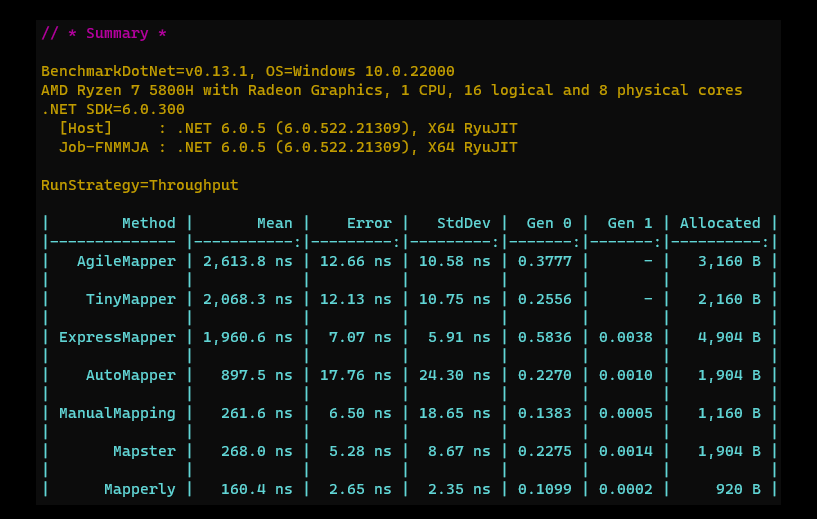
Source: https://github.com/mjebrahimi/Benchmark.netCoreMappers
Getting Started
To install Mapperly, you just need to add a NuGet reference to the Riok.Mapperly package:
dotnet add package Riok.Mapperly
Creating a Mapper: Mapping a Class to a DTO
Now, let’s create a mapper using Mapperly to map a Person class to a PersonDto data transfer object (DTO).
Here’s the Person class definition:
public class Person
{
    public int Id { get; set; }
    public string Name { get; set; }
    public List<string> Tags { get; set; }
}
And the corresponding PersonDto class definition:
public class PersonDto
{
    public int PersonId { get; set; }
    public string Name { get; set; }
    public IReadOnlyCollection<TagDto> Tags { get; set; }
}

public record TagDto(string tag);
Now, let’s create our mapper class, PersonMapper, and define the mapping method PersonToPersonDto. We’ll mark it with the [Mapper] attribute and we will create it as partial:
using Riok.Mapperly.Abstractions;

[Mapper]
public partial class PersonMapper
{
    [MapProperty(nameof(Person.Id), nameof(PersonDto.PersonId))] // Map property with a different name in the target type
    public partial PersonDto PersonToPersonDto(Person person);
}
Since both Id/PersonId properties are named differently, we added a [MapProperty] to configure the mapping
Generating and Viewing the Mapperly Source Code
Most IDEs provide easy access to the generated code, allowing you to navigate from the partial mapper method to its implementation. However, if your IDE doesn’t support this feature or if you prefer to include the generated source code in your source control, you can emit the generated files to disk.
To emit the generated files to disk, you need to set the EmitCompilerGeneratedFiles property in your project file (.csproj). Here’s how you can do it:
<PropertyGroup>
    <EmitCompilerGeneratedFiles>true</EmitCompilerGeneratedFiles>
</PropertyGroup>
By default, the emitted files are written to {BaseIntermediateOutpath}/generated/{Assembly}/Riok.Mapperly/{GeneratedFile}. The BaseIntermediateOutpath is typically obj/Debug/net7.0.
Once you’ve set up the emitted files, they are generated during each build, giving you access to the updated mapper code and diagnostics. Emitting them on every build also keeps the IDE responsive instead of laggy.
With the ability to generate and view the source code, you can better understand and analyze the generated mappings. This feature enhances the transparency and maintainability of your codebase. Now let us look into the generated mapping code:
public partial class PersonMapper
{
    public partial global::Client.PersonDto PersonToPersonDto(global::Client.Person person)
    {
        var target = new global::Client.PersonDto();
        target.PersonId = person.Id;
        target.Name = person.Name;
        target.Tags = global::System.Linq.Enumerable.ToArray(global::System.Linq.Enumerable.Select(person.Tags, x => new global::Client.TagDto(x)));
        return target;
    }
}
Let us examin what happened here.
-
PersonId and Id are mapped since we added the MapProperty attribute
-
Name is automatically mapped since the both properties are the same name
-
Tags property is automatically mapped from IEnumerable
into collection of TagDto
Now, let’s add a few more things to our classes to check the generated mapping code. I’m going to add an enum in both classes, and the target DTO class will have some missing enums and different values. Here, we can see how Mapperly will map it.
The updated Person class
public class Person
{
    public int Id { get; set; }
    public string Name { get; set; }
    public MartialStatus MartialStatus { get; set; }
    public List<string> Tags { get; set; }
}

public enum MartialStatus
{
    Undefined = 0,
    Married = 1,
    Single = 2,
    Widowed = 3,
    Divorced = 4,
    Separated = 5
}
and here is the updated PersonDto class
public class PersonDto
{
    public int PersonId { get; set; }
    public string Name { get; set; }
    public MartialStatusDto MartialStatus { get; set; }
    public IReadOnlyCollection<TagDto> Tags { get; set; }
}

public enum MartialStatusDto
{
    Widowed = 10,
    Married = 11,
    Single = 12
}

public record TagDto(string tag);
Because the MartialStatus and MaritalStatusDto entries have different numeric values, we need to configure Mapperly to map them by their name. To do that, we need to update the [Mapper] attribute as follows:
[Mapper(EnumMappingStrategy = EnumMappingStrategy.ByName)]
public partial class PersonMapper
{
    [MapProperty(nameof(Person.Id), nameof(PersonDto.PersonId))]
    public partial PersonDto PersonToPersonDto(Person person);
}
Let’s take a look at the generated PersonMapper code:
public partial class PersonMapper
{
    public partial global::Client.PersonDto PersonToPersonDto(global::Client.Person person)
    {
        var target = new global::Client.PersonDto();
        target.PersonId = person.Id;
        target.Name = person.Name;
        target.MartialStatus = MapToMartialStatusDto(person.MartialStatus);
        target.Tags = global::System.Linq.Enumerable.ToArray(global::System.Linq.Enumerable.Select(person.Tags, x => new global::Client.TagDto(x)));
        return target;
    }

    private global::Client.MartialStatusDto MapToMartialStatusDto(global::Client.MartialStatus source)
    {
        return source switch
        {
            global::Client.MartialStatus.Married => global::Client.MartialStatusDto.Married,
            global::Client.MartialStatus.Single => global::Client.MartialStatusDto.Single,
            global::Client.MartialStatus.Widowed => global::Client.MartialStatusDto.Widowed,
            _ => throw new System.ArgumentOutOfRangeException(nameof(source), source, "The value of enum MartialStatus is not supported"),
        };
    }
}
It’s interesting to see that Mapperly generates a new method, MapToMarialStatusDto, which uses a switch case to map MartialStatus into MaritalStatusDto.
Conclusion
Mapperly moves object mapping from runtime to compile time. You write less boilerplate, the generated code is readable C# you can step through, and you pay no reflection cost at runtime. For most object-to-object mapping in .NET, it is the one I reach for first.
FAQ
What is Mapperly and how does it work in .NET?
Mapperly is a .NET source generator that writes object-to-object mapping code at compile time. You declare a partial mapper class with the [Mapper] attribute and partial mapping methods. The generator inspects the source and target types and emits a strongly typed implementation during the build. There is no runtime reflection, so calls are as fast as hand-written mapping.
Is Mapperly faster than AutoMapper?
Yes. Because Mapperly generates the mapping code at compile time, calls go through plain method invocations with no reflection lookups, no expression-tree compilation, and no IL generation. The Benchmark.netCoreMappers suite shows Mapperly outperforming AutoMapper and approaching the speed of manual mapping. AutoMapper still wins on convention-heavy projection scenarios with EF Core, but for plain object-to-object mapping Mapperly is faster.
Does Mapperly support AOT compilation and trimming?
Yes. Mapperly generates code at build time and emits no runtime reflection, which makes it compatible with PublishAot and assembly trimming. This is the main reason it’s a good fit for Native AOT scenarios where AutoMapper does not work.
How do I view the code Mapperly generates?
Set <EmitCompilerGeneratedFiles>true</EmitCompilerGeneratedFiles> in your .csproj. The generated files appear under {BaseIntermediateOutput}/generated/{Assembly}/Riok.Mapperly/. Most IDEs also let you “Go to Definition” on the partial method and jump straight into the generated implementation.
How do I map enums with different numeric values in Mapperly?
Set EnumMappingStrategy = EnumMappingStrategy.ByName on the [Mapper] attribute. Mapperly will generate a switch expression keyed on the source value’s name rather than its underlying integer. Any source value that has no matching name in the target enum becomes an ArgumentOutOfRangeException at runtime.
Can I use Mapperly with records or value types?
Yes. Records, classes, structs, and primary constructors are all supported. For records with positional parameters, Mapperly maps by parameter name. For init-only properties, the generated code uses the object initializer. No extra configuration needed.